shaderRenamer
By : ominMzn Published on Tuesday, November 19, 2013,12:55:44 in 3D plugins
 It will be a great inspiration for us to create more useful projects for Customers like you.
PROJECT HIGHLIGHTS:
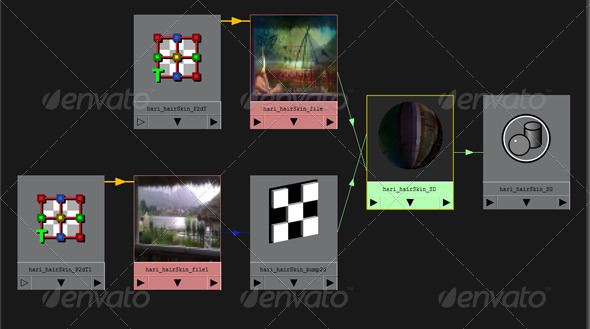
It is a simple tool that rename shaders and its connections.
It takes key name from file texture if file texture is connected. Else it takes the name of mesh as a key name to rename the shaders.
Renaming pattern “keyName + nodeType”
Works on selected shader as well.
Make sure your texture contains atleast single ”_”.
for Eg:
If your texture File Name is “abc_skin_color.jpg” then key name will be “abc_skin_skin”. Here Key name is “abc_skin” while renaming lambert10 shader where “abc_skin_color.jpg” is connected to color attribute it results “abc_skin_sd”, “abc_skin_file”, “abc_skin_P2DT”, “abc_skin_SG”.....etc
Additional scripts along this downloads:
1.TextureUpdate.mel:- allows you to update textures. select the geometry and excute the script.
2.swapCache.mel: swap the caches if cache name is exactly same for difference shots.
For Eg:
current cache directory for shot001: d:\project\sc001\cache\abcCharacter\abc_body\abc_bodyShape.mc
target cache directory for shot002: d:\project\sc002\cache\abcCharacter\abc_body\abc_bodyShape.mc
“Name and path must be same except shot
put “sc001” in search for(CURRENT SCENE).
put “sc002” in repalace with(NEW SCENE).
put frame count for new shot ie shot 002.
press apply
- Feel free for any help or queries regarding this templet. Simply inbox me via my profile page. I would be grateful if you could rate this project in your download section.
watch video at high res.
http://youtu.be/7Jy1IFXnEX8
It will be a great inspiration for us to create more useful projects for Customers like you.
PROJECT HIGHLIGHTS:
It is a simple tool that rename shaders and its connections.
It takes key name from file texture if file texture is connected. Else it takes the name of mesh as a key name to rename the shaders.
Renaming pattern “keyName + nodeType”
Works on selected shader as well.
Make sure your texture contains atleast single ”_”.
for Eg:
If your texture File Name is “abc_skin_color.jpg” then key name will be “abc_skin_skin”. Here Key name is “abc_skin” while renaming lambert10 shader where “abc_skin_color.jpg” is connected to color attribute it results “abc_skin_sd”, “abc_skin_file”, “abc_skin_P2DT”, “abc_skin_SG”.....etc
Additional scripts along this downloads:
1.TextureUpdate.mel:- allows you to update textures. select the geometry and excute the script.
2.swapCache.mel: swap the caches if cache name is exactly same for difference shots.
For Eg:
current cache directory for shot001: d:\project\sc001\cache\abcCharacter\abc_body\abc_bodyShape.mc
target cache directory for shot002: d:\project\sc002\cache\abcCharacter\abc_body\abc_bodyShape.mc
“Name and path must be same except shot
put “sc001” in search for(CURRENT SCENE).
put “sc002” in repalace with(NEW SCENE).
put frame count for new shot ie shot 002.
press apply
- Feel free for any help or queries regarding this templet. Simply inbox me via my profile page. I would be grateful if you could rate this project in your download section.
watch video at high res.
http://youtu.be/7Jy1IFXnEX8
MY PROJECTS:
Nature Logo Reveal
 Elegant Leaves Logo Reveal
 Elegant Cube Logo Reveal
 Raising Sun In Dawn
 Cloudy Blue Sky
 Beautiful Sun Set
 shaderRenamer
 Thank You!
ominMzn
Thank You!
ominMzn


